
Every day, millions of professionals scroll through LinkedIn, yet most press releases never gain traction. LinkedIn press release SEO is the key to making your announcements visible and discoverable.
Simply sharing your news is not enough. Without proper keywords, structure, and timing, even the most exciting announcements can disappear without a trace.
This guide shows you step-by-step techniques to optimize your LinkedIn press releases for both LinkedIn's algorithm and Google search. LinkedIn articles are indexable by Google, meaning a well-optimized release on LinkedIn can earn search visibility that lasts long after the post leaves your followers' feeds.
If you are looking for the step-by-step mechanics of how to format and publish a press release on LinkedIn specifically, see our dedicated guide: How to Post a Press Release on LinkedIn. This guide focuses on the SEO strategy layer on top of that foundation.
Key Highlights
LinkedIn has over 1 billion members globally - optimized press releases on the platform reach decision-makers, investors, and journalists that traditional wire services often miss. (LinkedIn, 2024)
LinkedIn Articles are indexed by Google: a properly structured release published as an article can rank in organic search results for months or years after publication.
Multimedia, hashtags, and tagging key contacts amplify engagement and visibility.
Maintaining a regular posting rhythm (1-2 releases per month) balances consistency with audience interest.
Tracking impressions, click-through rate, and follower growth after each release allows you to refine timing, keywords, and format for compounding impact over time.
Why Does LinkedIn Press Releases Matter for SEO?
Posting press releases on LinkedIn puts your brand in front of the right professionals and can even rank on Google for long-term visibility. Optimized LinkedIn press releases help you reach your audience, boost credibility, and drive engagement.
Direct Access to Professionals
Reach investors, clients, and industry peers directly. LinkedIn ensures your news lands in front of relevant professionals who are more likely to engage and share.
Searchable Content
Optimized posts with keywords and structured content can appear on both LinkedIn and Google, increasing discoverability and extending your announcement's lifespan. According to SEMrush data, LinkedIn articles with keyword-optimized headlines have a measurably higher chance of appearing in Google's top 10 results for branded and industry-specific queries.
Credibility Boost
Well-structured releases signal authority, showing professionalism and building trust with journalists, investors, and clients.
Engagement Opportunities
Tag team members, partners, or media contacts, and include visuals or videos. Interactive posts increase visibility and reach across professional networks.
Cost-Effective Visibility
LinkedIn press releases are low-cost compared to traditional distribution, providing targeted exposure and long-term SEO benefits without heavy investment.
LinkedIn SEO and your broader press release SEO strategy work together - for a full picture of how press release distribution affects your search visibility beyond LinkedIn, see our guide on the role of SEO in press release distribution.
How to Post a Press Release on LinkedIn | Step-by-Step
Posting correctly is just as important as writing a strong press release. Follow these steps to ensure your news reaches the right audience, gets noticed, and drives engagement: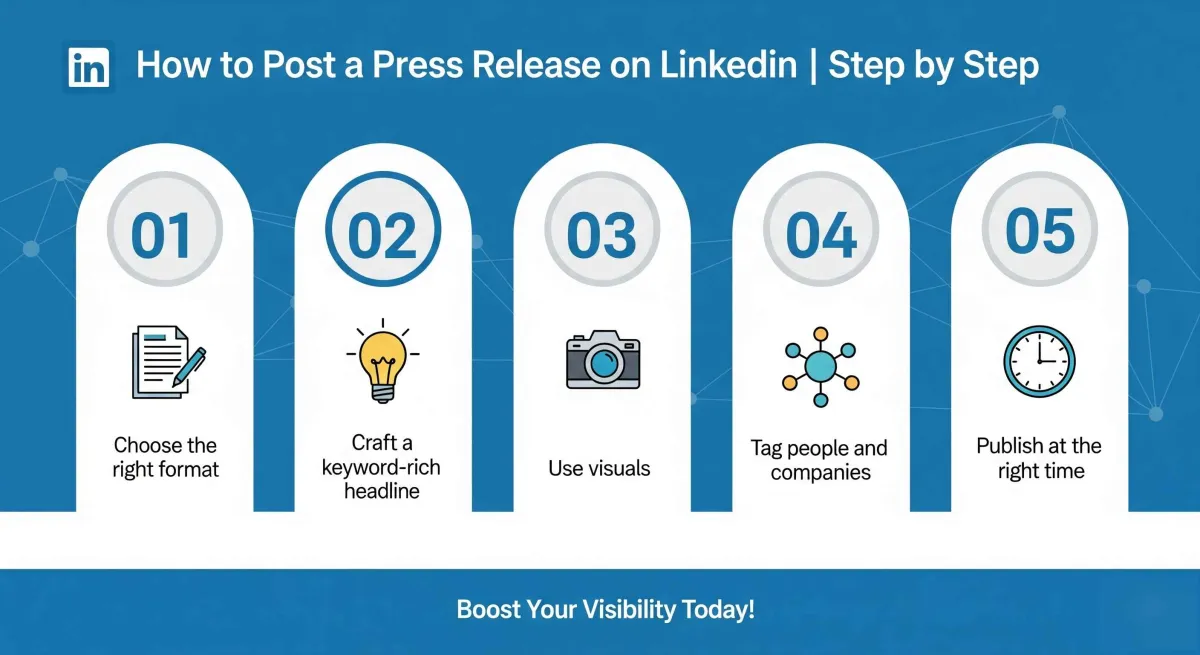
Step 1: Choose the Right Format
LinkedIn offers two main ways to share your press release:
- In-feed post: Ideal for short updates or teasers. Limited to 3,000 characters, perfect for quick announcements.
- LinkedIn Article: Best for long-form announcements or full press releases. Articles can be indexed by search engines, boosting visibility.
Step 2: Craft a Keyword-Rich Headline
Your headline should grab attention and clearly communicate the news:
- Include your main keyword naturally, e.g., "LinkedIn Press Release SEO."
- Keep it concise, engaging, and easy to read.
Step 3: Add Multimedia
Visual content increases engagement:
- Include images, infographics, or short videos to make your release more appealing.
- Use descriptive filenames and alt text to help with search visibility.
Step 4: Tag Relevant People and Companies
Mention employees, partners, or clients involved in the news. Tags help your post reach a broader network and improve discoverability.
Step 5: Publish at the Right Time
Timing can affect engagement and visibility:
- Best days: Tuesday-Wednesday
- Optimal hours: Morning (7-8 AM) or late afternoon (5-6 PM)
Publishing when your audience is active ensures better engagement and higher chances of your news being seen.
For a more detailed walkthrough of the full posting process including how to format the release itself before publishing, see our complete guide: How to Post a Press Release on LinkedIn.
How to Optimize a Press Release for SEO on LinkedIn?
Optimizing your press release ensures it is discoverable both on LinkedIn and Google. Proper SEO boosts visibility, drives engagement, and positions your brand as an authority. Follow these best practices to optimize a press release for seo on LinkedIn:
Use Keywords Strategically
- Place your primary keyword in the headline, opening paragraph, and subheadings.
- Integrate secondary keywords naturally throughout the content.
- Focus on readability first, avoid overstuffing. Quality content always wins.
Research from Backlinko shows that content with the target keyword in the title tag is significantly more likely to rank on page one. The same principle applies to LinkedIn article headlines, which function as title tags when Google indexes them.
Structure Your Content for Readability
- Keep paragraphs short to make the content easy to scan.
- Use bullet points, numbered lists, and subheadings to break up information.
Include 1-3 relevant backlinks to your website or trusted sources for SEO authority.
Enhance with Multimedia
- Add images, infographics, charts, or videos to make your release visually appealing.
- Use descriptive filenames and alt text with keywords to help LinkedIn and Google understand the content.
Write a Short Summary
- The first 1-2 lines act like a meta description for LinkedIn previews and Google search results.
- Keep it concise, clear, and enticing to encourage clicks and engagement.
Leverage Hashtags Strategically
- Use 3-5 relevant hashtags (e.g., #PressRelease, #LinkedInSEO, #BusinessGrowth) to expand reach.
- Avoid overloading the post, which can appear spammy.
Include a Clear Call-to-Action (CTA) and Encourage Engagement
- Tell readers what to do next: visit your website, download a report, register for an event, or comment.
- End posts with a question or prompt to spark interaction.
- Respond promptly to engagement to boost reach in LinkedIn's algorithm.
For a deeper guide on crafting headlines and meta descriptions that work for both LinkedIn and Google, see our guide on optimizing press release headlines and meta descriptions.
Maximum Reach for LinkedIn Press Releases
To ensure your LinkedIn press release gets maximum visibility, engagement, and SEO benefit, you need a strategy beyond just posting. Follow these steps to amplify reach:
In-feed post (for quick updates):
- Craft a short, attention-grabbing teaser instead of posting the full press release.
- Use a strong hook in the first line (question, bold statement, or emoji).
- Include one clear link to the full press release on your website.
LinkedIn Article (for detailed announcements):
- Repurpose the full press release with added context or insights.
- Add internal links to relevant website pages.
- Customize SEO titles and meta descriptions for Google indexing.
Optimize for SEO and Discoverability
- Conduct keyword research and include primary keywords in the headline, first paragraph, subheadings, and image alt text.
- Avoid keyword stuffing, prioritize readability and value.
- Structure content with the inverted pyramid: put key info first, followed by quotes, background, and supporting details.
Boost Engagement and Amplification
- Tag relevant people, employees, partners, or media contacts.
- Encourage conversation by ending posts with a question. Reply promptly to early engagement to boost algorithmic visibility.
- Use 3-5 relevant hashtags to increase discoverability.
- Repurpose the content into carousel posts, visuals, or short updates to reach different audiences.
Leverage Distribution Channels
- Encourage employees to share on their personal profiles, this expands organic reach.
- Cross-promote on other social channels, newsletters, and websites.
- For high-priority announcements, consider LinkedIn Sponsored Content to target specific audiences.
LinkedIn's own data shows that posts including a link to external content generate 45% higher engagement rates than text-only posts. It makes the combination of a teaser post and a full LinkedIn Article the highest-ROI format for press release distribution on the platform.
SEO-optimized press releases gain organic visibility, but strategic posting, engagement, and amplification ensure maximum reach across LinkedIn and beyond.
Posting Frequency: How Often to Publish LinkedIn Press Releases?
Maintaining a consistent posting schedule is crucial for visibility and engagement. Posting too often can overwhelm your audience, while posting too infrequently may reduce your brand's presence on LinkedIn.
Recommended Frequency:
- Publish 1-2 major press releases per month to stay visible without saturating your audience.
Monitor Engagement:
- Use LinkedIn analytics to track when your audience is most active.
- Identify which types of content generate the most interactions and adjust your posting schedule accordingly.
Adjust Strategically:
- Based on performance data, tweak timing and frequency to maximize reach and engagement, ensuring each release gets the attention it deserves.
For a broader framework on how often to publish press releases across all channels - not just LinkedIn. See our guide on how often you should send a press release.
Common LinkedIn Press Release Mistakes to Avoid
Avoiding these common mistakes helps ensure your LinkedIn press releases achieve better visibility, engagement, and SEO results:
1. Keyword Stuffing: Overloading your post with SEO terms makes it hard to read and can hurt performance. Focus on natural placement of primary and secondary keywords.
2. Ignoring Visuals: Posts without images, infographics, or videos tend to get overlooked in the feed. Visual content increases engagement and encourages shares.
3. Poor Timing: Publishing outside peak hours reduces reach and limits immediate engagement. Analyze your audience activity to post when they're most active.
4. Missing a Clear CTA: Without a call-to-action, readers may not know what step to take next. Always guide them whether it's visiting your website, downloading a resource, or leaving a comment.
5. Not Tracking Results: Posting without monitoring your data makes it impossible to know what resonates with your audience. To see what’s working, always analyze your LinkedIn press release metrics to refine your future strategy.
Step-by-Step LinkedIn Press Release SEO Checklist
Before you hit publish, use this checklist to ensure your LinkedIn press release is optimized for maximum visibility, engagement, and SEO performance.
Following these steps helps your news get noticed by the right audience and boosts your brand authority.
- Headline under 70 characters with primary keyword
- Keywords naturally in first 3 paragraphs
- At least one image, infographic, or video
- Short paragraphs with subheadings and bullet points
- Include 1-3 backlinks to authority sites
- Add 3-5 relevant hashtags
- Schedule during peak engagement hours
- Include a clear CTA
- Analytics tools ready to track performance
For the full distribution process once your LinkedIn release is live including how to repurpose it across other channels. See our guide on press release distribution workflow.
Conclusion
LinkedIn press releases achieve their full potential when optimized for both SEO and audience engagement.
By crafting strategic headlines, structuring content clearly, incorporating multimedia, and posting at the right time, your announcements get noticed, shared, and discoverable in search results.
Consistently tracking performance and refining your approach ensures ongoing improvement.
When combined with global distribution through EasyPRwire, your news not only reaches LinkedIn but also amplifies your brand's visibility, credibility, and authority across the web.
Start your next press release with EasyPRwire and make every announcement work harder.
Frequently Asked Questions
What is LinkedIn press release SEO?
LinkedIn press release SEO is the practice of optimizing press releases on LinkedIn to rank in both LinkedIn’s internal feed and Google search results. It involves blending traditional search engine optimization with social media algorithms to maximize organic reach. Key tactics include targeted keyword placement in headlines, structured formatting, multimedia alt-text, and publishing specifically as a LinkedIn Article to ensure search engine indexing.
How do I post a press release on LinkedIn?
To post a press release, go to your LinkedIn homepage and select the "Write article" option to unlock long-form publishing features. Upload a high-resolution banner image, paste your headline, and insert your text. You can format headers, embed links, and add multimedia elements directly into the body. For a complete step-by-step walkthrough, see our dedicated guide: How to Post a Press Release on LinkedIn.
How do I SEO optimize my LinkedIn press release?
To optimize your LinkedIn press release for search engines and feed algorithms, follow these steps:
Format as an Article: Publish using the LinkedIn Articles feature, as standard updates are not indexed by Google.
Optimize the Headline: Place your primary keyword at the beginning of your headline and within the first 100 words.
Structure with Headings: Use clear H2 and H3 subheadings and keep paragraphs under three sentences for readability.
Include Rich Media: Add at least one image or video, ensuring the file name and alt-text contain your target keywords.
Insert Backlinks: Embed 1–3 contextual links back to your website or landing page to pass search equity.
What is the best way to post a press release on LinkedIn?
The most effective strategy is a "hub-and-spoke" model. First, publish the full, un-edited press release as a structured LinkedIn Article for long-term Google indexing. Next, create a short, engaging in-feed video or text post as a "teaser." Finally, tag relevant companies or executives in the teaser post and include a clear call-to-action linking back to your full LinkedIn Article.
Can LinkedIn press releases improve Google rankings?
Yes, but only when published as LinkedIn Articles. Standard in-feed posts are not indexed by search engines and offer no search ranking benefits. Because LinkedIn holds massive domain authority, an SEO-optimized LinkedIn Article can rank quickly on Google for competitive keywords, driving high-intent organic traffic back to your main website via embedded backlinks.


