
Ending a press release is not just about finishing a text. It is about signaling to a journalist that your document is professional. It shows you follow industry standards like AP Style. In the world of news, how you "end your press release" is just as important as your headline.
A strong ending tells the reader three things: Who you are, How to contact you and That the story is complete. And with that, journalists spend less than one minute deciding whether a press release is worth pursuing. If your ending is unclear, cluttered, or unprofessional, your release may be ignored.
This guide provides the exact templates and symbols you need. This includes the standard "###" mark. These steps ensure your release meets the high standards of modern newsrooms. It also helps you get the earned media coverage you deserve.
Key Highlights:
Standard End Marks: Use "###" or "-30-" to show the story is over.
Boilerplate Excellence: Keep it between 50 and 100 words.
Contact Accessibility: Always provide a direct phone number and email.
Actionable CTAs: Direct journalists to a digital media kit for high-res assets.
AP Style Adherence: Follow specific formatting to maintain professional credibility.
The Standard Sign-Off Protocol: A Quick Checklist for Ending a Press Release
Below is the standard visual layout journalists expect at the end of a professional press release.
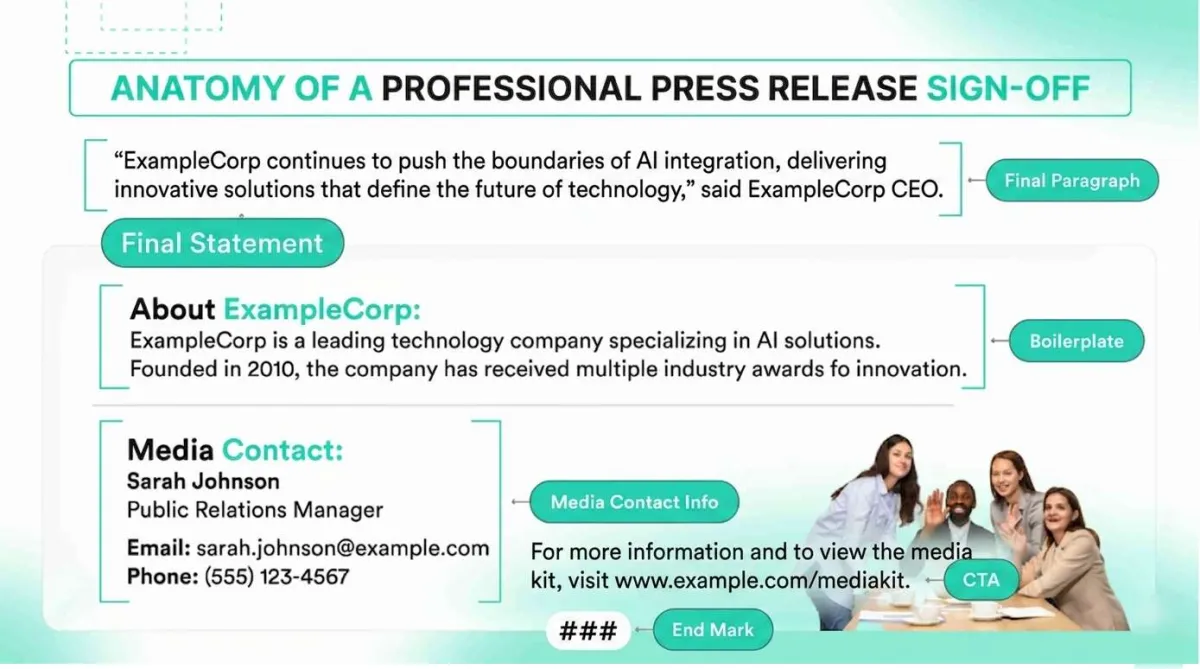
Before we dive into the details, you need a quick way to check your work. A professional press release ending has a very specific "look." If you deviate from this look, journalists might think you are a beginner.
Here is your quick checklist for a perfect press release sign-off:
The Last Paragraph: This should wrap up the story. It often includes a quote or a final thought.
The Boilerplate: This is your "About Us" section. It gives the background of the company.
The Media Contact: This tells the reporter who to call. It must include a name, email, and phone number.
The CTA: This is a "Call to Action." It tells the reporter where to find more photos or videos.
The End Mark: This is a centered symbol like "###." It tells the reader there is no second page.
This checklist is used by PR agencies, Corporate comms team, Newswire services, and Media relations professionals. It is the safest format to follow.
If you have these five things, you are ahead of 90% of other people. Most people forget at least one of these.
When you include all of them, you make the journalist’s job easy. When their job is easy, they are more likely to write about you.
So, If you’re thinking: What is the correct way to end a press release?
A press release should end with a final paragraph, followed by a company boilerplate, media contact details, a CTA linking to assets or a media kit, and a centered end mark (### or -30-) at the very bottom.
Why the Conclusion of a Press Release Impacts Media Pickup?
Journalists work fast. They scan, skim and decide quickly.
When they reach the end of a press release, they are asking three things:
Who is behind this story?
Can I contact someone now?
Is this the full version?
A good ending does three things: confirms credibility, enables action and signals completion.
Why Most Press Releases Fail at the End?
Many press releases fail for simple reasons like missing contact information. Long, marketing-heavy “About-Us” sections, No clear end symbol, Vague CTAs, and links to homepages instead of assets.
Understanding the Journalist’s Workflow
A reporter does not read a press release for inspiration. They read it for speed and accuracy.
At the end of a press release, a journalist needs three things.
1. Context: Who is this company or Organization? Are they real? Are they credible?
The answer comes from boilerplate.
2. Access: Who can I call or email right now? Who can give me a quote?
This comes from the media contact section.
3. Finality: Is this the full story? Is something missing?
This comes from the end mark.
Crafting the Professional Press Release Boilerplate
The boilerplate is one of the most misunderstood parts of a press release. Many people think it is just a place to brag. That is a mistake. In PR, the boilerplate is a factual tool.
Boilerplate vs. “About Us” Section: The Strategic Difference
A typical "About Us" page on a website is for customers. It uses flowery language. It tries to sell a product.
A Boilerplate is for journalists. It uses hard facts. It answers the question: "Who is this organization and why do they matter?" It should be written in the third person. It should stay the same for almost every press release you send. This builds a consistent brand image in the eyes of the media.
A 3-Step Formula for a High-Authority Boilerplate
To write a perfect boilerplate, follow this simple 3-step formula:
1. The Identity Statement: Who are you? (Example: "ABC Tech is a software company based in Austin, Texas.")
2. The Mission or Impact: What do you do? (Example: "The company develops AI tools that help doctors find diseases faster.")
3. The Proof Point: Why should we believe you? (Example: "Founded in 2010, ABC Tech has won three national awards for innovation.")
Why "Boilerplate"?
You might wonder why it is called a "boilerplate."
Long ago, printing was done with metal plates. The parts of the newspaper that stayed the same every day, like the name of the paper were made on heavy iron plates. These were called boilerplates. In PR, we use this term because this section of your news release stays the same every time.
Examples of Effective Boilerplates
To reach a high level of authority, let’s look at how different industries write their boilerplates. You can copy these structures for your own needs.
Example 1: The Startup Boilerplate
"GreenGrid is a clean-energy startup founded in 2022. Based in Seattle, the company creates solar panels that work even in cloudy weather. GreenGrid recently raised $5 million in funding to expand its reach to the East Coast. For more information, visit www.greengrid.com."
You may like: Why Startups Choose EasyPRwire for Global Media Coverage?
Example 2: The Large Corporation Boilerplate
"Global Logistics Inc. (NYSE: GLI) is a world leader in shipping and supply chain management. With over 50,000 employees in 120 countries, GLI moves more than 2 million packages every day. Since 1950, the company has focused on speed and sustainability. Discover more at www.gli.com/newsroom."
Example 3: The Non-Profit Boilerplate
"The Literacy Project is a 501(c)(3) non-profit organization. Our mission is to provide free books to children in low-income neighborhoods. Since our start in 2015, we have donated over 100,000 books across the country. We believe that every child deserves the chance to read."
Formatting Media Contact Information for Maximum Utility
The media contact section is the most critical part of your ending. If a journalist likes your story, they will want to ask a question. If they can't find your phone number quickly, they will move on to the next story. They are always on a deadline.
Critical Data Points Journalists Need
You must provide direct access. Do not give them a general customer service line. Do not give them an " info@ " email address. They need to talk to a real person.
Include these five pieces of information:
Full Name: Who are they talking to?
Job Title: Are you the PR Manager? The CEO? The Founder?
Email Address: Use a direct, professional email.
Phone Number: Include your direct office line or cell phone.
Availability: If you are in a different time zone, mention that.
Formatting Contact Details for Maximum Accessibility
The standard way to format this is to put it at the very bottom. Some people put it at the top, but the bottom is the industry standard for the "Sign-Off."
Correct Format:
Media Contact:
Name: Sarah Jenkins
Title: Director of Communications
Company: TechNova Solutions
Email: s.jenkins@technova.com
Phone: (555) 123-4567
AP Style Standards: The Press Release End Symbols (### and -30-)
The end mark is a small detail that makes a big difference. It is a signal to the journalist. It tells them: "The story stops here. There is nothing else to read."
The History and Purpose of the “###” Symbol
In the old days of newspapers, stories were sent via telegraph or printed on long sheets of paper. Editors needed to know if a story was finished or if there was another page coming.
The symbol ### became the standard way to say "The End." It is widely recognized by every major news outlet in the world. If you use it, you look like you know exactly what you are doing.
What about "-30-"?
You might also see the number -30- at the end of a press release. This is an older symbol used by reporters in the mid-1800s, reflecting the early evolution of press release writing. While “###” is more common today, “-30-” is still perfectly acceptable and is often seen in traditional print journalism. Using either one shows that you respect the history of the profession.
Correct Placement of the End Symbol in a Press Release
You should place your end mark in the center of the page. It should appear at the very end of the release, after the media contact details and CTA. This signals to the journalist that the entire document is complete.
Using CTAs and Digital Media Kits to Support Journalists
In 2026, a press release is not just a block of text. It is a gateway to digital content. Journalists today need to produce stories for websites, social media, and TV. This means they need more than just quotes. They need "assets."
Furthermore, aligning these multimedia assets with strategic PR campaign timing ensures that reporters have everything they need right at the moment your news cycle breaks, preventing missed coverage during peak media windows.
What Makes a Good Press Release CTA?
A Call to Action tells the reader what to do next. In a press release distribution, the CTA should help the journalist build a better story.
Instead of saying "Call us for more info," try something more helpful to create a good PR CTA:
"Download high-resolution images here."
"Watch the video interview with our CEO."
"Access the full research report here."
What is a Digital Media Kit?
A Digital Media Kit (DMK) is a folder or webpage. It contains everything a reporter might need. A strong media kit includes:
High-quality photos of your product.
Headshots of your leadership team.
A company logo in different sizes.
Video clips (B-roll) that they can use for news segments.
When you link to a media kit at the end of your release, you reduce "friction." Friction is anything that makes a journalist's job harder. When you remove friction, you increase your chances of getting a "Yes."
3 Professional Templates for Your Press Release Ending
Here are three press release end templates you can use right now. Just fill in the blanks.
Template 1: Corporate/Financial Announcement Ending
This is for earnings reports, mergers, or new hires.
[Final paragraph of the news story.]
About [Company Name]: [Company Name] is a publicly traded firm (NASDAQ: XXXX) specializing in [Industry]. Since [Year], the company has provided [Service] to over [Number] clients worldwide.
Media Assets: High-resolution photos and additional resources are available at [Link to Media Kit].
Media Contact:
Name: [Name]
Title: [Title]
Email: [Email]
Phone: [Direct Phone]
###
Template 2: Product/Innovation Launch Sign-Off
This is for new gadgets, software, or consumer goods.
[Final paragraph about the product availability.]
About [Product Name]: [Product Name] is the latest innovation from [Company]. Designed to solve [Problem], it features [Key Feature]. For more details, visit [Link to Product Page].
Media Assets: High-resolution photos and product demos are available at [Link to Media Kit].
Media Contact:
Name: [Name]
Email: [Email]
Phone: [Phone]
###
Template 3: Non-Profit/Public Initiative Conclusion
This is for charity events, community projects, or awareness campaigns.
[Final paragraph with a quote from the organizer.]
About [Organization]: [Organization] is a non-profit dedicated to [Cause]. We operate in [Location] and serve [Number] people annually. Join us at [Website].
Media Assets: High-resolution photos and additional resources are available at [Link to Media Kit].
Media Contact:
Name: [Name]
Email: [Email]
Phone: [Phone]
###
Common Professional Errors: What to Avoid in Your Conclusion
Even experienced PR people make mistakes. Here are the top things to avoid when ending your press release:
1. The "Wall of Text": Don't make your boilerplate too long. If it is 300 words, nobody will read it. Keep it under 100 words.
2. The Dead Link: Always check your links! If a journalist clicks your media kit and gets a "404 Error," they will be frustrated.
3. The "No-Reply" Email: Never use an email that nobody checks. If a reporter asks a question, you should answer within 15 minutes if possible.
4. Mixing Styles: Don't use "###" in one release and "-30-" in the next. Pick one and be consistent.
5. Forgetting the Date: While the date goes at the top, ensure your boilerplate is up to date with the current year's facts.
Media Utility: How a Strong Ending Impacts Earned Media Success?
In the framework of Topical Authority, we talk about "Media Utility." This means how useful your document is to the person receiving it.
A press release is not an advertisement. It is a piece of raw material for a news story. If you end it correctly, you are giving the journalist a "finished kit." They can take your headline, your body text, your boilerplate, and your photos and turn them into a story in minutes.
In summary, a strong press release ending increases journalist follow-ups, improves media pickup, reduces back-and-forth emails, and speeds up publication.
The better your ending, the higher your "utility." High-utility releases get published. Low-utility releases get deleted.
How to Measure the Success of Your Press Release Sign-Off?
How can you tell if your conclusion is doing its job? Look for these signs:
Media Inquiries: Are reporters calling the number you provided?
Asset Use: Did the news site use the photo from your media kit?
Accurate Descriptions: Did the article use the exact words from your boilerplate?
Direct Links: Did the news site link back to your website using the URL you provided in the CTA?
If the answer is yes, then your ending is working. You are successfully guiding the journalist to the finish line.
Conclusion
The conclusion of your press release is the bridge between a journalist’s interest and a published story. Ending a press release correctly is about professional etiquette and utility.
You have learned the importance of the ### symbol. You know how to write a factual, 3-step boilerplate. You understand that your contact information must be direct and easy to find. Finally, you see how a Digital Media Kit can make your story stand out in a crowded inbox.
By mastering these elements, you transform your press release into a high-performance media tool. You are no longer just sending "info." You are providing a professional service to the newsroom. This is how you build long-term relationships with the media and ensure your news gets the attention it deserves.
Frequently Asked Questions
What does “###” mean in a press release?
It is a symbol used to show the end of the news copy. It tells the journalist there are no more pages. It is the industry standard for finality.
Should I link to my homepage or a Media Kit?
You should link to a Media Kit. A homepage can be confusing for a reporter. A Media Kit page has exactly what they need: photos, logos, and facts.
Is the sign-off different for wire services vs. direct email?
The content is the same. However, wire services like EasyPRWire often have specific fields for your boilerplate and contact info. When sending via email, make sure these sections are clearly separated by the ### symbol.
What is the ideal word count for a boilerplate?
The best boilerplates are between 50 and 100 words. Anything longer starts to look like a brochure. Keep it short and punchy.
Can I use "The End" instead of "###"?
It is better to use "###." In the professional PR world, "The End" looks amateur. Using "###" shows you understand the traditions of journalism.


